As I prepared for technical interviews and organized my Computer Science notes, I realized I needed more than just a simple note-taking app. I wanted a cozy, inviting space to store and revisit my learnings—something that felt personal rather than corporate. Existing platforms were either too generic, lacked the technical features I needed (like code highlighting and LaTeX support), or simply didn't match the aesthetic I envisioned. This led me to build Ari's Study Room: a custom content management system with a block-based editor inspired by Notion and Medium, but tailored specifically for technical study notes. The goal was to create something that combined the warmth of a personal blog with the power of a structured learning platform—featuring problem statements, code blocks with syntax highlighting, complexity analysis, and step-by-step walkthroughs. What started as a personal project became an exercise in building a complete full-stack application from scratch, with authentication, dynamic routing, a sophisticated admin dashboard, and a carefully crafted visual identity using lavender-pink pastels that make studying feel cozy rather than clinical.
The Vision: A Cozy Study Space
I wanted Study Room to feel different from typical technical documentation or coding blogs. Most platforms for technical content have a sterile, corporate feel—black and white themes, sharp edges, dense typography. They're functional but uninviting.
My vision was a space that felt like settling into a comfortable reading nook with a warm cup of tea. Soft lavender and pink pastels, rounded corners, gentle shadows, and clean typography using the Inter font. Every design decision aimed to make studying feel like a pleasure rather than a chore.
This wasn't just about aesthetics—research shows that comfortable learning environments improve retention. By creating a visually pleasant space, I hoped to make my study sessions more productive and enjoyable.
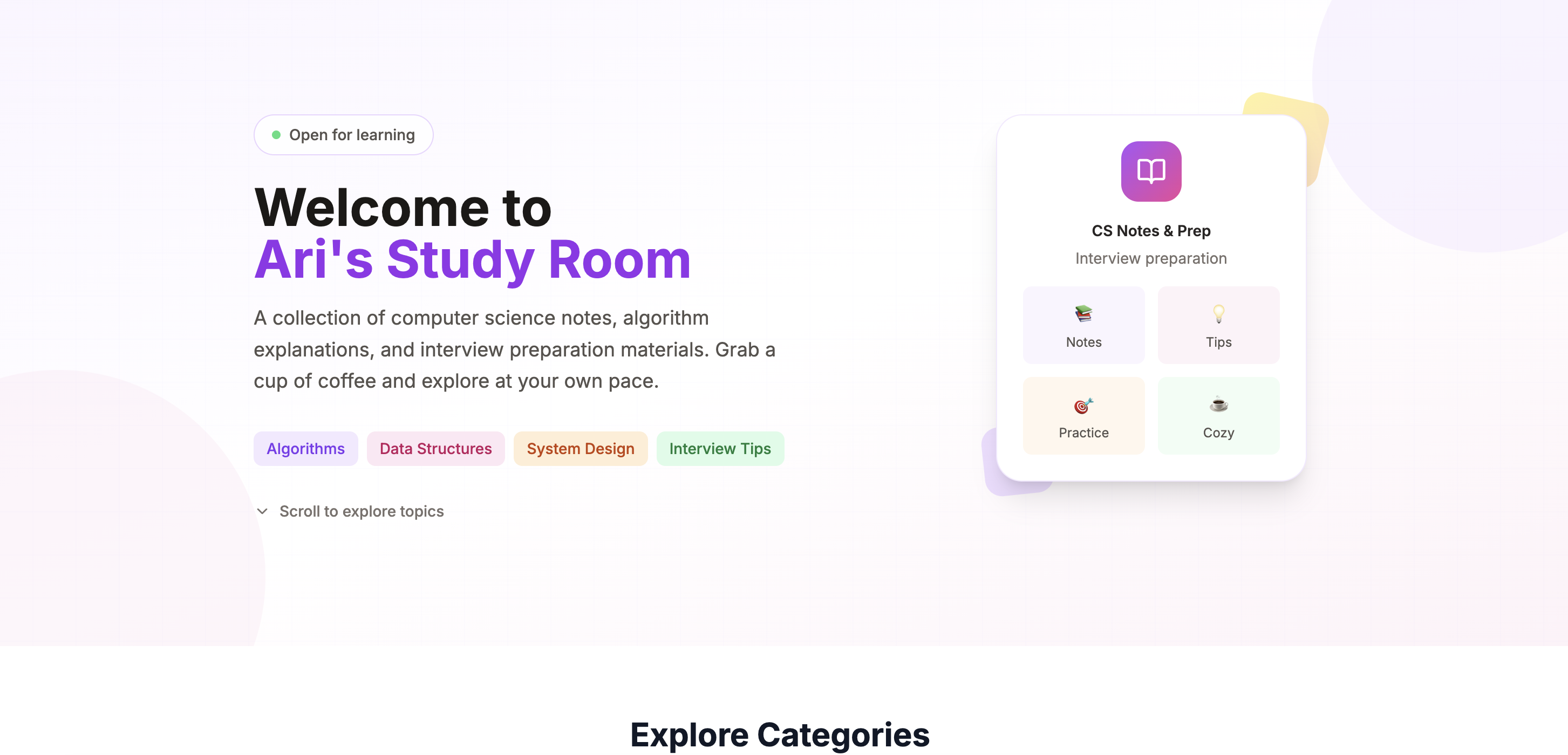
The Study Room landing page with its warm, inviting design
Building a Block-Based Editor
The heart of Study Room is its block-based content editor. Unlike traditional WYSIWYG editors, each piece of content is a discrete block with its own type and properties. This approach, popularized by Notion, offers incredible flexibility for technical content.
I designed nine specialized block types:
- Problem Statement for coding challenge descriptions
- Examples for input/output demonstrations with explanations
- Math/Approach for LaTeX equations and algorithm theory
- Code Block with syntax highlighting across 20+ languages
- Complexity Analysis for Big O notation
- Walkthrough for step-by-step explanations with optional code
- Related Problems for linking to similar content
- Tips List for tips, warnings, and notes with visual variants
- Rich Text for general HTML content
Each block type has its own editor component and renderer, ensuring a clean separation between editing and display.
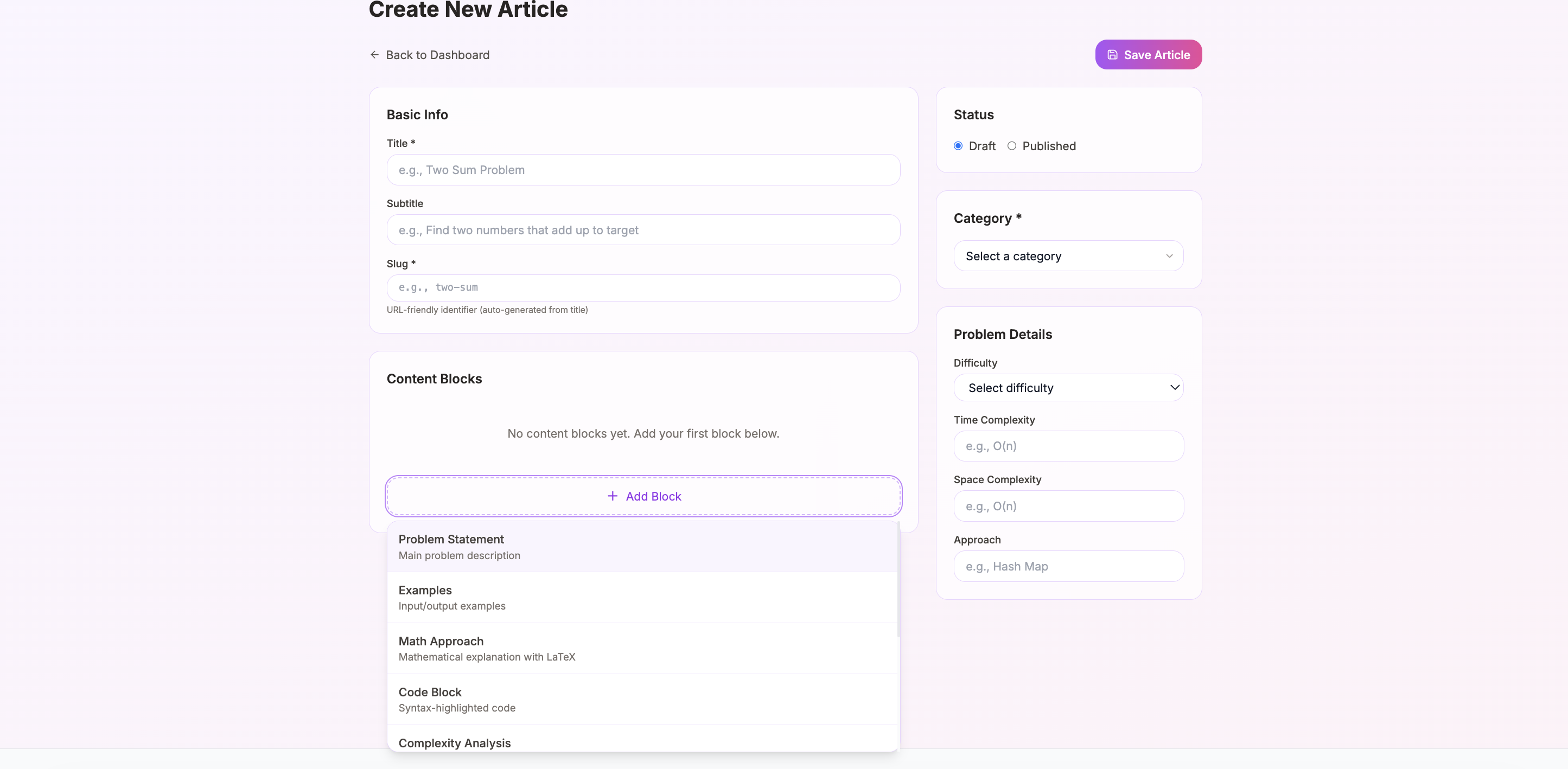
The block-based editor with various content types
The Technical Stack
I chose Next.js 15 with the App Router for its powerful features: server components for fast initial loads, API routes for backend logic, and excellent TypeScript support. The App Router's file-based routing made implementing the dynamic category and article pages straightforward.
MongoDB with Prisma ORM handles data persistence. MongoDB's flexible document model is perfect for storing varied block types—each article's content field contains an array of blocks, and each block can have different properties based on its type. Prisma provides type safety and an excellent developer experience.
Authentication uses NextAuth.js v4, protecting the admin dashboard while keeping the public-facing study notes accessible to everyone. Session management with JWTs keeps things simple and scalable.
Styling leverages Tailwind CSS with a custom color palette. I defined lavender, pink, and warm gray color scales that create the cozy aesthetic I envisioned. Lucide React provides consistent, beautiful icons throughout the interface.
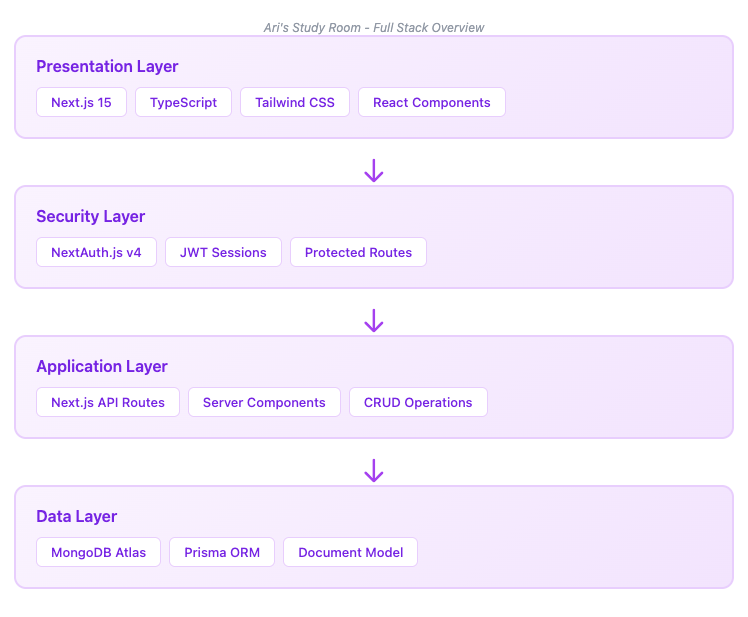
Technical architecture showing the full stack
Dynamic Category System
Study materials need organization. I built a dynamic category system that supports nested hierarchies—perfect for structuring content like 'Data Structures > Trees > Binary Search Trees'.
Each category has customizable properties: name, description, icon, and color theme. I created preset color themes that maintain the cozy aesthetic while providing visual distinction between categories. A 'shuffle colors' feature randomly assigns pleasant combinations when creating new categories.
The admin interface makes category management intuitive. Create, edit, reorder, and delete categories without touching code. Article counts display next to each category, helping identify where content is sparse. Empty categories show a friendly 'Coming Soon' state rather than a blank page.
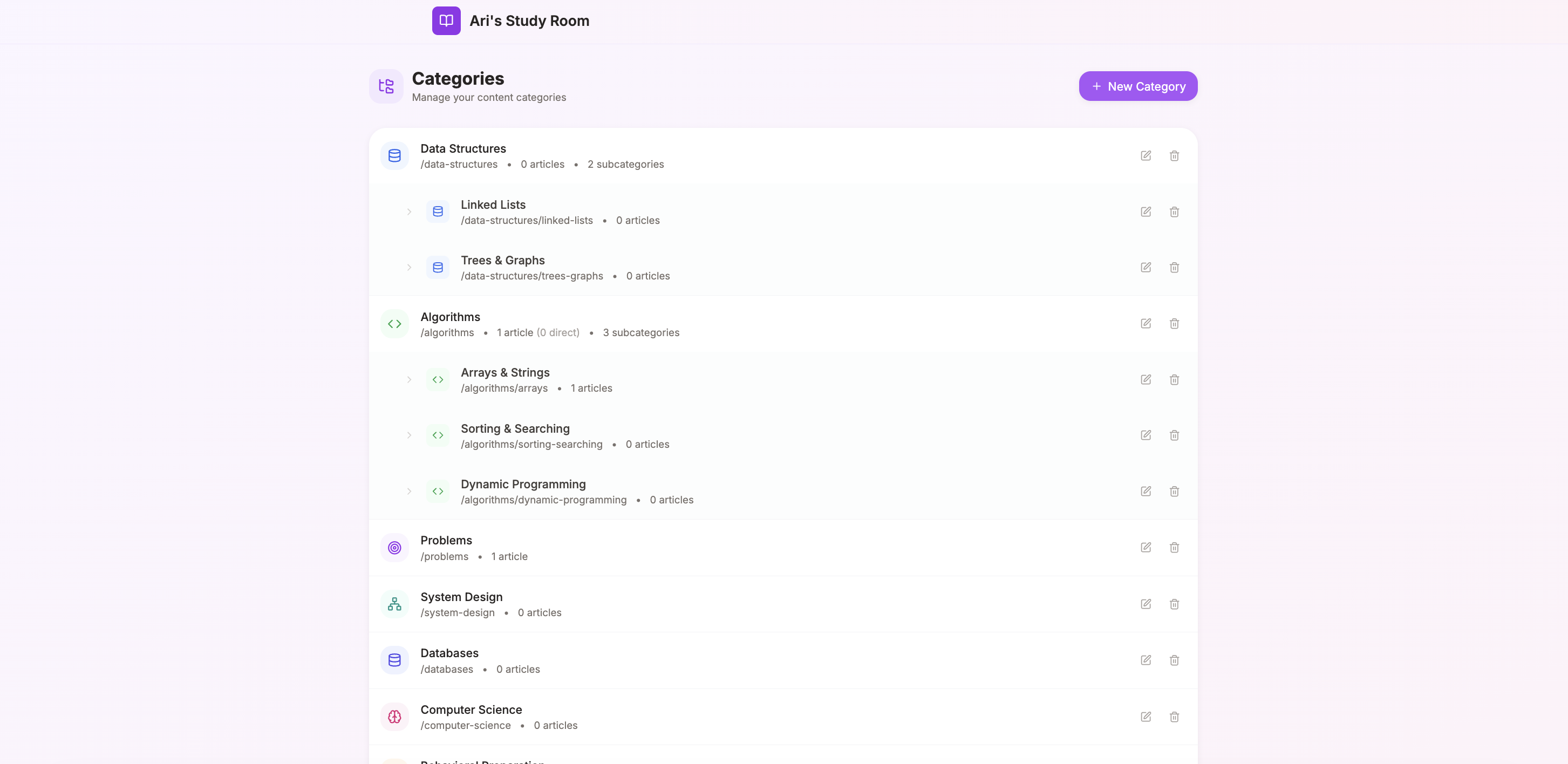
Category management interface with nested hierarchy
Live Preview and Article Management
Writing technical content requires seeing how it will render. I implemented live preview that updates as you type, showing exactly how code blocks highlight, how LaTeX equations render, and how the final article will look.
The article editor includes metadata fields for difficulty level, time complexity, space complexity, and algorithmic approach. These surface in article cards and help readers quickly assess content relevance.
Draft and published states allow working on articles over time without exposing incomplete content. A simple toggle switches between states, and the admin dashboard clearly distinguishes drafts from published pieces.
Breadcrumb navigation generates automatically from the category hierarchy. Readers always know where they are and can easily navigate to parent categories.
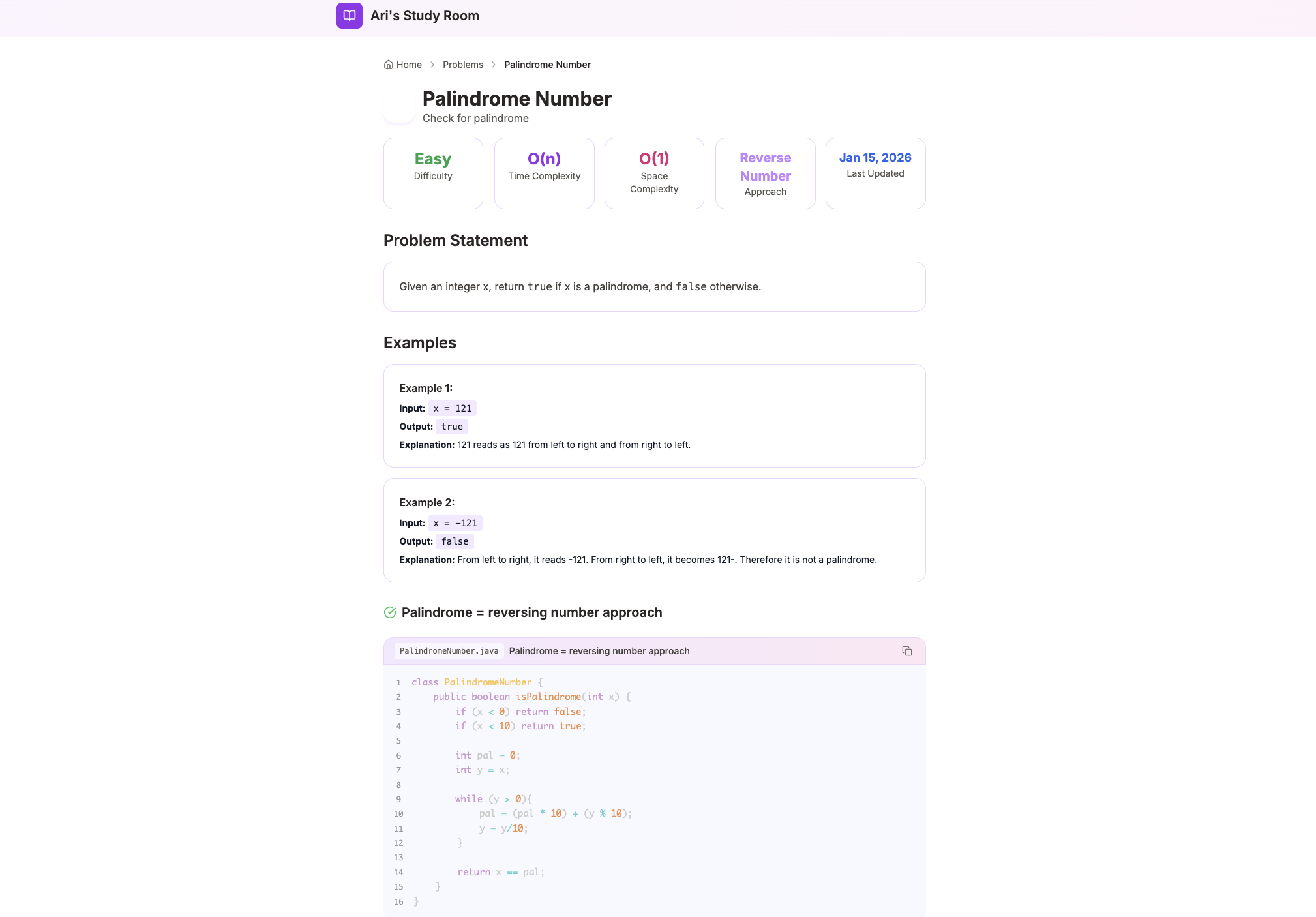
Article editor with live preview and metadata fields
Code Highlighting and Math Rendering
Technical study notes live and die by code presentation. I integrated React Syntax Highlighter with the Prism theme, supporting syntax highlighting for Python, JavaScript, TypeScript, Java, C++, Go, Rust, and many more languages.
Code blocks include language selection, line numbers, and copy-to-clipboard functionality. The styling maintains readability while fitting the warm color palette—no harsh black backgrounds, but gentle contrast that's easy on the eyes during long study sessions.
Math rendering uses KaTeX, the same engine used by Khan Academy. Inline and block equations render beautifully, essential for explaining algorithm complexity, recurrence relations, and mathematical proofs. The rendering is fast enough that equations appear instantly in live preview.
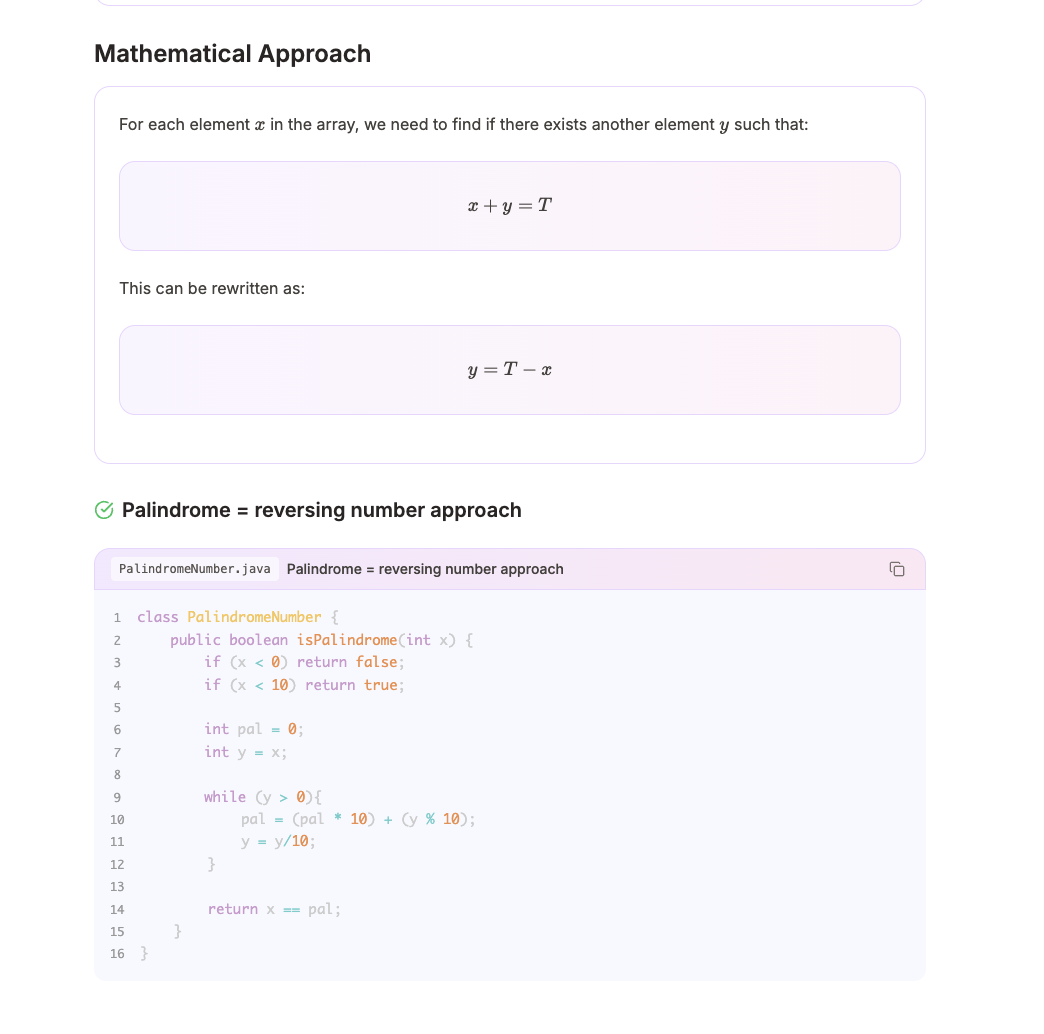
Code blocks with syntax highlighting and KaTeX math rendering
Authentication and Security
The admin dashboard needs protection while study notes remain public. NextAuth.js handles authentication with a credentials provider—email and password stored securely with bcrypt hashing.
Middleware protects all `/admin` routes, redirecting unauthenticated users to the login page. I learned an important lesson here: the middleware matcher needs to explicitly include `/admin` as a route, not just `/admin/:path*`. This subtle difference caused issues where the base admin route was accessible without authentication.
Session tokens use secure HTTP-only cookies with the `__Secure-` prefix in production. Logout properly clears the session and redirects to the home page. Small details, but they matter for a complete authentication implementation.
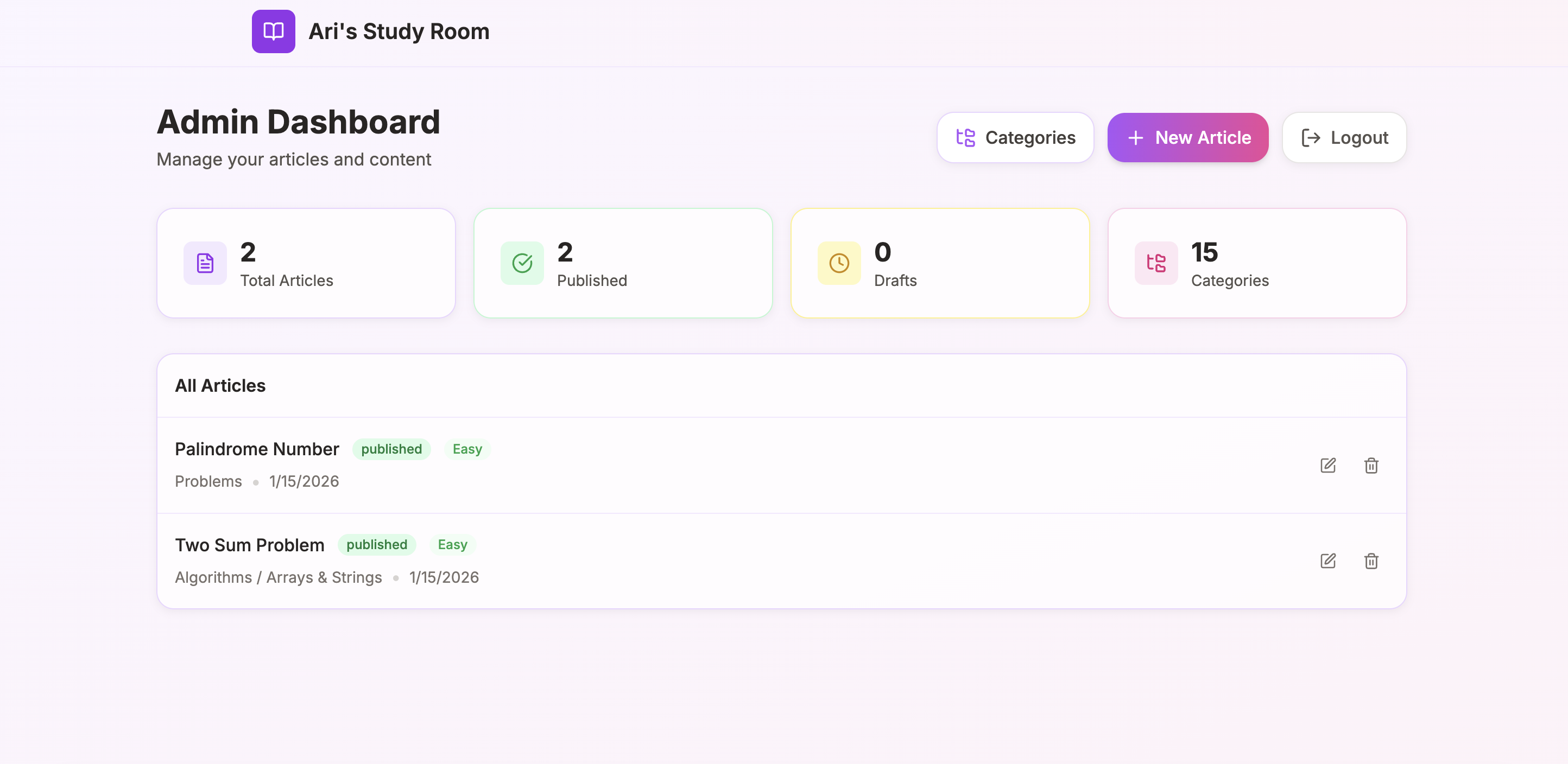
Protected admin dashboard with article management
Challenges and Solutions
Building a CMS from scratch surfaced several challenges. The block editor's complexity grew quickly—managing state for multiple block types, handling reordering, ensuring each block's editor validated its specific fields. I solved this with a component registry pattern: each block type registers its editor and renderer, and the main editor dynamically loads the appropriate component.
MongoDB's flexible schema was both blessing and curse. Without Prisma's type safety, it would've been easy to store malformed data. I defined strict TypeScript interfaces for each block type and used Prisma's JSON field type to store the block array while maintaining type checking in application code.
The dynamic routing for categories and articles required careful thought. A path like `/data-structures/trees/binary-search-trees/inorder-traversal` could be a category or an article. The solution: check if the final slug matches an article first, then fall back to category rendering. This creates clean, readable URLs without sacrificing flexibility.
Deployment and Production
Deployment uses Vercel for the Next.js application and MongoDB Atlas for the database. Vercel's tight integration with Next.js means zero-config deployments—push to main, and the site updates within minutes.
MongoDB Atlas provides a free tier generous enough for a personal study blog. Network access configuration required attention—Vercel's dynamic IP ranges meant allowing broader access than I'd prefer, but Atlas's authentication and encryption keep data secure.
Environment variables manage secrets: database connection strings, NextAuth secrets, and admin credentials for initial setup. The setup process is documented in the README, making it easy to fork and deploy your own instance.
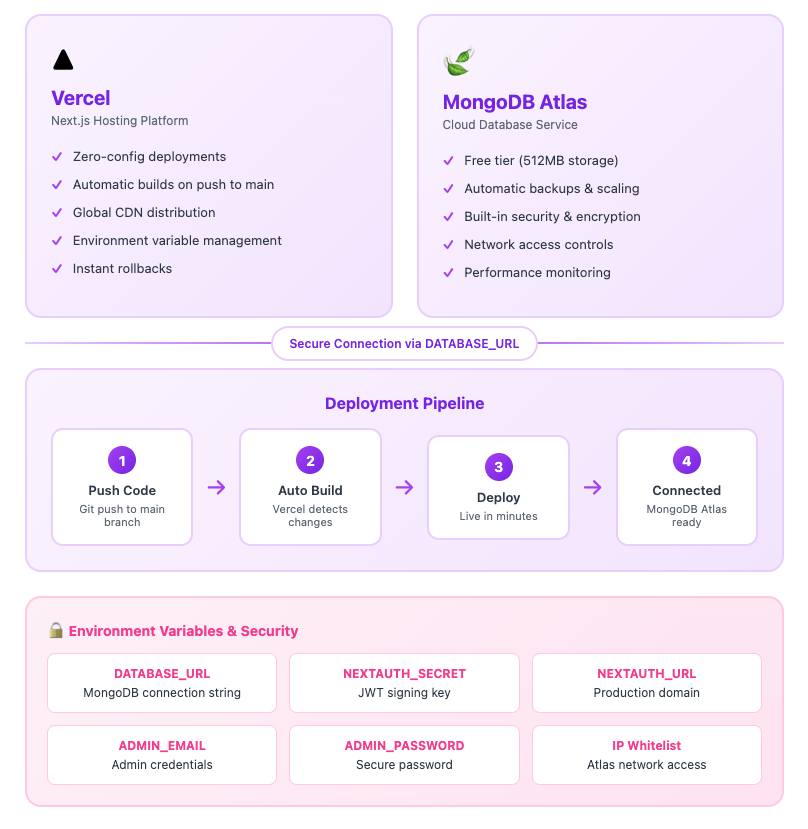
Production deployment architecture on Vercel and MongoDB Atlas
What I Learned
Building Study Room reinforced several important lessons:
Full-stack thinking matters. Every decision—from database schema to component architecture to deployment strategy—affects the whole system. Understanding these connections leads to better solutions.
User experience drives architecture. The block-based editor exists because it creates a better writing experience. Live preview exists because immediate feedback improves content quality. Features should solve real problems, not demonstrate technical capability.
Personal projects deserve production quality. It would've been easy to cut corners on authentication, error handling, or accessibility. But treating this as a real product forced me to learn properly—and the result is something I'm proud to share and actually use.
Design is iterative. The cozy aesthetic didn't emerge fully formed. It evolved through use, feedback, and refinement. Good design comes from observation and adjustment, not just initial inspiration.
Current Features
Content Management:
- 9 specialized block types for technical content
- Live preview while editing
- Draft/Published status management
- Article metadata (difficulty, complexity, approach)
Organization:
- Dynamic nested category hierarchy
- Customizable category icons and colors
- Automatic breadcrumb navigation
- Article counts per category
Technical Features:
- Syntax highlighting for 20+ languages
- KaTeX math equation rendering
- SEO-optimized dynamic metadata
- Responsive design for all devices
Security:
- NextAuth.js authentication
- Protected admin routes
- Secure session management
- bcrypt password hashing
Future Plans
Study Room is actively used and continuously improved. Planned enhancements include:
Search functionality to quickly find articles across all categories. Full-text search across titles, content, and code blocks.
Spaced repetition integration to surface articles for review based on learning science principles. The system would track when you last studied each topic and suggest optimal review timing.
Export options for generating PDF study guides or Anki flashcard decks from article content.
Collaborative features to allow others to contribute notes while maintaining editorial control.
The foundation is solid. Each enhancement builds on the existing architecture, making Study Room increasingly valuable as a learning companion.
Let's Connect
Contact Information
Email:buildwithari.dev@gmail.com
Location:Boston, MA